Summary:
- An AV integrator takes end-to-end responsibility for design, installation, programming, and support. A reseller delivers equipment. The difference shows up at go-live.
- Look for CTS-D (design) and CTS-I (installation) certifications from AVIXA. These are the industry standard, not optional extras.
- Modern AudioVisual systems run on your network. Prepare VLANs, QoS policies, and bandwidth before installation begins, not after.
- Platform certification matters. If your organization runs Microsoft Teams, confirm the integrator is Microsoft Teams Rooms certified before any hardware is specified.
- Commissioning is not the same as installation. Insist on a documented commissioning report before project sign-off.
- The system runs for five to ten years. Ongoing support, firmware updates, and training matter as much as the install itself.
Are you an IT manager being asked to manage an AV integration project?
If your organization is planning new meeting rooms, upgrading existing spaces, or standardizing AudioVisual systems across a facility, the responsibility often lands on IT. That makes sense: modern AudioVisual systems are network infrastructure. They authenticate against your directory, run on your VLANs, consume your bandwidth, and generate IT support tickets when they fail.
What is less obvious is how different a well-executed AV integration project looks from a poorly executed one, and what specifically to look for when evaluating an AV integrator.
What is the difference between an AV integrator and an AV reseller?
An audiovisual integrator designs, installs, programs, and supports a complete system and takes full project responsibility for how it performs in your specific environment. A reseller delivers equipment. That distinction matters because the physical installation of hardware is roughly 30 percent of the work in a modern AudioVisual project. The remaining 70 percent is system design, network configuration, programming, commissioning, and training.
A common misconception is that any company selling AudioVisual equipment can also integrate it. True integration requires acoustic analysis, signal flow design, platform certification, VLAN configuration, and programming expertise. A vendor without that depth will deliver hardware that technically powers on but does not perform reliably in your environment. The difference becomes apparent within weeks of go-live, usually in the form of IT support tickets.
What certifications should an AV integrator hold?
CTS-D and CTS-I certifications from AVIXA are the recognized industry standard for AudioVisual design and installation professionals. CTS-D (Certified Technology Specialist, Design) confirms demonstrated competency in system design, acoustics, signal flow, and project documentation. CTS-I (Certified Technology Specialist, Installation) confirms that the technician installing the system is qualified to commission it correctly, including calibration, testing, and formal handover.
These certifications should be held in-house by the staff actually assigned to your project, not by a subcontractor brought in for installation. Ask specifically whether the certified staff will be on your project, not just employed by the firm.
Backman Vidcom holds CTS-D and CTS-I certifications across its technical team and has delivered AudioVisual systems for institutions across Atlantic Canada since 1976.
What questions should IT managers ask before signing with an integrator?
The following questions protect your project and expose vendors who cannot deliver:
- Does your team hold CTS-D and CTS-I certifications in-house, and will those staff be assigned to our project? Subcontracted installation creates accountability gaps that typically surface during commissioning or in the first months of operation.
- How do you handle network integration? A qualified certified AV professional will ask about your VLANs, QoS policies, firewall rules, and bandwidth requirements before specifying any equipment. If this question is not raised in the first meeting, that is a warning sign.
- What platform certifications do you hold? If your organization runs Microsoft Teams, confirm Microsoft Teams Rooms certification. Platform certification means the hardware and software are validated to work together and that there is a supported update path.
- What does your commissioning process look like, and will we receive a commissioning report? Commissioning is the full documented test of every system function before handover. It should produce a written report. If a vendor does not offer one, the system has not been formally validated.
- What does ongoing support look like after installation? Understand response time commitments, what is covered under warranty versus a support agreement, and how firmware updates and platform compatibility are managed over the system lifecycle.
- Will you conduct a site assessment before submitting a proposal? No qualified audiovisual systems integrator should specify equipment without visiting the room. Ceiling height, acoustic conditions, sightlines, natural light, and existing infrastructure all affect what will perform reliably.
How should IT prepare the network for an AV integration?
AudioVisual systems have become significant consumers of network resources. Video conferencing, 4K displays, digital signage players, IP-based audio, and room control systems all generate traffic and require specific network conditions to perform reliably.
Before installation begins, IT should complete the following:
- Create dedicated VLANs for AudioVisual devices to isolate traffic and simplify troubleshooting.
- Configure QoS to prioritize real-time audio and video.
- Confirm bandwidth headroom for rooms running simultaneous conferencing and content sharing.
- Ensure DNS and DHCP are configured for the number of new endpoints being added.
- Review firewall rules for the specific ports required by the conferencing platforms in use.
A competent AV expert will provide a network requirements document as part of the design phase. If this document is not forthcoming before installation begins, request it explicitly. Installing AudioVisual endpoints onto an unprepared network is the single most common cause of post-installation performance issues.
What should IT managers know about the commissioning process?
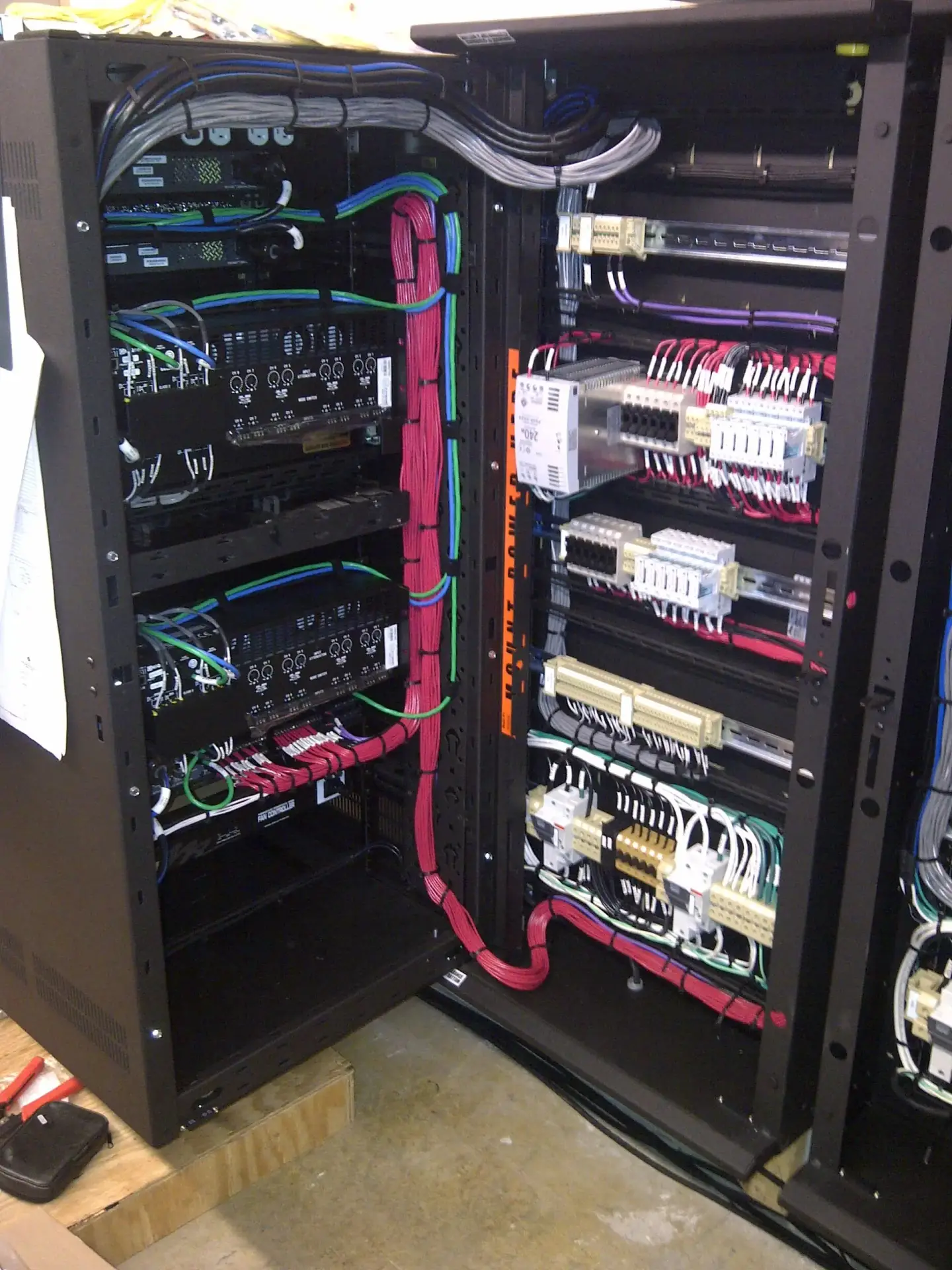
Commissioning is not the same as installation. Installation is the physical placement and connection of equipment. Commissioning is the full test and validation of the system, including every input, every output, every control function, acoustic calibration, and platform authentication, before the system is handed over to the client.
A properly commissioned AudioVisual system should arrive with a written commissioning report documenting what was tested, the results, and sign-off by the lead technician. This document is the baseline for any future support or warranty claim. Without it, there is no verified record of what the system was designed to do.
Why does staff training matter as much as the installation itself?
A system that users cannot operate generates IT support tickets. Training is not optional and should not be compressed into a brief walkthrough on handover day.
Effective training for AudioVisual systems covers three groups. End users need to know how to start a meeting, share content, and adjust audio without calling IT. Facilities or AV administrators need to manage system settings, update configurations, and troubleshoot common issues. IT staff need to understand network dependencies, device management procedures, and firmware update protocols.
Ask your integrator what training is included in the project scope and whether user documentation specific to your installation is provided. Generic manufacturer manuals are not a substitute for documentation that reflects how the system was actually programmed for your environment.
AudioVisual insights built for Atlantic Canada organizations. Practical guidance for the people who manage technology, delivered monthly. Subscribe to the Backman Vidcom newsletter at backmanvidcom.ca.
If Backman Vidcom has supported your organization, a Google review takes two minutes and helps other Atlantic Canada decision-makers find a trusted partner. Leave a review here:
Frequently Asked Questions
What is an AV integrator?
An AV integrator is a company that designs, supplies, installs, programs, and supports complete audiovisual systems for commercial and institutional clients. Unlike a reseller who delivers equipment, an integrator takes responsibility for how the system performs in your specific environment from the first site assessment through to long-term support.
What is the difference between CTS-D and CTS-I certification?
CTS-D (Certified Technology Specialist, Design) is awarded to professionals who have demonstrated competency in audiovisual system design. CTS-I (Certified Technology Specialist, Installation) is awarded to those qualified to install and commission AudioVisual systems to AVIXA’s international standards. Both are administered by AVIXA, the global authority in audiovisual standards.
How long does a commercial AV integration project take?
A standard meeting room or boardroom typically takes two to four weeks from signed proposal to commissioning, depending on equipment lead times. Larger environments such as multi-room campuses, control rooms, or broadcast facilities require longer timelines and should be discussed early in the planning process.
What should I ask for at project handover?
Request a commissioning report documenting every function tested and the results, user and administrator documentation specific to your installation, and a written support agreement with clear response time commitments.
Do AudioVisual systems require ongoing maintenance?
Yes. Platform updates, firmware changes, and hardware wear all require ongoing attention across the system lifecycle. A support agreement with your integrator is the most reliable way to maintain performance and stay current with platform compatibility.
What is the right VLAN configuration for AV systems?
AudioVisual devices should be placed on dedicated VLANs separate from general corporate traffic. This isolates AV traffic, simplifies troubleshooting, and allows QoS policies to prioritize real-time audio and video without affecting other network services. Your integrator should provide specific VLAN and QoS requirements as part of the system design documentation.
How do I know if an integrator is Microsoft Teams Rooms certified?
Ask the integrator directly and request documentation of the certification. Microsoft Teams Rooms certification confirms that the integrator has met Microsoft’s requirements for designing and deploying Teams Rooms environments, including hardware compatibility and platform validation.
Backman Vidcom has been designing and installing AudioVisual systems for institutions across Atlantic Canada since 1976. The team holds CTS-D and CTS-I certifications in-house and handles every phase of every project without subcontracting: site assessment, design, installation, programming, commissioning, training, and ongoing support.
If your organization is planning an AV integration project or evaluating integrators, start with a site assessment. Call 902-450-5005 or contact the team here. Backman Vidcom serves organizations across Nova Scotia, New Brunswick, Prince Edward Island, and Newfoundland.